TRON energy
in Telegram.
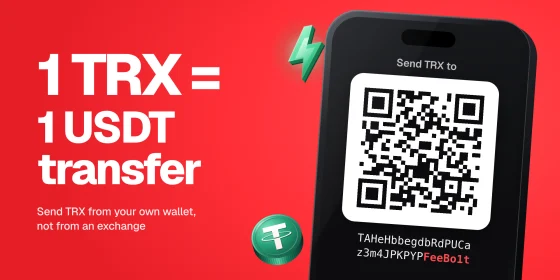
@feebolt_bot puts energy on your wallet so your next USDT transfer burns no TRX. No sign-up and no wallet connection: you send TRX, the energy comes back to the same wallet.

- No sign-up
- English and Russian
- Automatic refunds
How it works in the bot
Four steps from your first message to a USDT transfer that burns no TRX.

Open @feebolt_bot
Tap Start. The bot shows its payment address and how much energy each amount buys, in English or Russian (switch any time in your profile).
Send TRX from your own wallet
Send TRX to the bot's address from the wallet you'll send USDT from: TronLink, Trust Wallet or any wallet you hold the keys to. Not from an exchange: the energy goes to whichever wallet the TRX came from.
Energy arrives on that wallet
Usually within 1–2 minutes, as a standard TRON delegation you can see on Tronscan. It stays for an hour. If it can't be delivered, your TRX goes back to your wallet automatically.
Send your USDT
Send USDT from the same wallet as usual, within the hour. The transfer uses the energy and the network burns no TRX for it.
What you can do in the bot
Quick energy takes one TRX transfer. The rest is there when you need it.
Quick energy
Copy the address, send TRX, done. The bot tells you what amount your transfer needs, and with a balance it repeats your last order in one tap.
Custom order
Energy to any wallet, for an hour, a day or three days, for as many transfers as you need. Pay from your balance or your wallet, in TRX or USDT.
Balance and history
Top up in TRX or USDT, from an exchange too, and pay from your balance. Every order with its status and receipt, in the same account as the web dashboard.
USDT without TRX
No TRX on your wallet at all? Pay from your balance: we put the energy on your wallet and you send the USDT from your usual app.
Check a wallet
Send the bot any TRON address to see its balances and energy. For your own wallets, turn on notifications about orders.
Invite friends
Share your link: for every friend who makes a first paid transfer, you get one transfer free.
Stay safe
Scammers fake addresses, not bots. A few habits keep you out of reach.
Copy the address only from the bot. It ends in
FeeBo1t: check those characters before every payment.Never take it from your wallet history. Scammers send dust from lookalike addresses so a fake lands in your history. A lookalike address is a scam.
We never ask for keys. No seed phrase, no private key, no wallet connection: the bot only works with transfers you make yourself.
Official accounts only. The bot is
@feebolt_bot, support is@feebolt_support. Check the username letter by letter.
If the energy can't be delivered, your TRX comes back automatically.
Questions
Is this FeeBolt's official bot?
Yes. Our bot is @feebolt_bot and our support is @feebolt_support; we have no other accounts. Check the username letter by letter, and copy the payment address only from the bot: it ends in FeeBo1t.
Can I pay from an exchange?
Not for quick energy: the energy goes to the wallet the TRX came from, and an exchange pays from its own wallet, so the energy would go there. Your balance is different: top it up from an exchange, then order energy to your wallet with a custom order.
How fast does the energy arrive?
Usually within 1–2 minutes of your payment being confirmed on chain. The delegation shows on Tronscan, and if you saved the wallet in the bot with notifications on, the bot tells you when it's there.
What if the energy can't be delivered?
Your TRX is refunded in full, automatically, to the wallet it came from. Payments outside the accepted amounts, USDT sent to the bot's address and transfers from smart contracts are refunded too. Only dust that the network fee would eat isn't refunded. Refund policy
Where do I see prices?
In the bot, before you pay: Quick energy shows how much energy each amount buys, and "Which amount?" tells you what your transfer needs.
Do I need an account?
No. Open the bot and pay, that's all. A balance, saved wallets and history are tied to your Telegram and appear once you use them.
Open @feebolt_bot
Energy for your USDT transfer, for one TRX transfer from your own wallet.